KCA Student Portal: A Simple Guide to Login, Fees, and Results
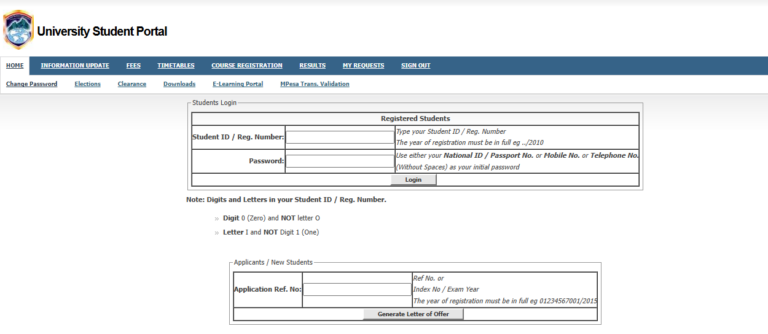
To access the kca student portal, visit the official KCA University website and navigate to the student login page. You will need your Student Registration Number and a secure password. The portal allows you to register for units, view your fee statement, check semester results, and download your admission letter. If you forget your password, use the “Forgot Password” link to reset it via your registered student email.
University life in Kenya has changed a lot. A few years ago, if you wanted to check your exam results or get a fee statement at KCA University, you had to travel to the Ruaraka campus. You would likely spend hours in traffic on Thika Road, then stand in a long queue at the Registrar’s or Bursar’s office.
Those days are mostly gone. The kca student portal has replaced the long lines and the paperwork. Now, whether you are at home in Nakuru, in a cyber cafe in Nairobi, or relaxing in your hostel, your academic records are just a click away.
This digital system is part of a bigger shift in Kenyan education. According to reports from Nation Africa, more universities are moving their services online to save time and reduce costs for students. For a KCA student, mastering the portal is just as important as attending lectures. It is the heart of your academic life.
What Is KCA Student Portal?
The kca student portal is a secure online platform where KCA University students manage their academic and financial records. It acts as a bridge between the student and the university administration. Instead of visiting different offices, you use this single website to handle almost everything.
The system is designed to be user-friendly. You don’t need to be a tech expert to use it. If you can use a smartphone or social media, you can navigate the portal. It uses your unique registration number to keep your data private and safe.
Key Portal Details
| Feature | Description |
| System Type | Enterprise Resource Planning (ERP) Portal |
| Primary User | Registered KCA University Students |
| Main Functions | Fee tracking, Unit registration, Exam results |
| Login ID | Student Registration Number |
| Availability | 24/7 (Subject to system maintenance) |
Why Kenyans Need KCA Student Portal
Kenyan students face unique challenges, from high transport costs to busy work-study schedules. The portal helps solve these issues in several ways:
-
Saves Money: You don’t need to spend money on matatu fare to go to campus for simple tasks like picking up a result slip.
-
Accuracy: Errors in fee payments are easier to spot when you can see your statement in real-time. This is helpful for parents who want to ensure school fees reach the university.
-
Convenience: You can register for units in the middle of the night or on a weekend.
-
Data Security: Your records are stored digitally. Unlike a physical piece of paper that can get lost, your portal records are always there.
-
Speed: According to the Kenya National Bureau of Statistics (KNBS), digital service adoption is rising because it speeds up service delivery in public and private institutions.
Types or Categories Related to KCA Student Portal
The portal is divided into different sections. Each section serves a specific purpose for your journey at the university.
1. Academic Section
This is where you handle your studies. You use this part to register for the units you will study during the semester. If you don’t register here, your name will not appear on the class list or the exam list. You also use this section to check your final marks at the end of the semester.
2. Financial Section
This is often the most visited part of the kca student portal. It shows your fee balance, the payments you have made, and any invoices issued by the university. It is very helpful when applying for HELB loans or bursaries because you can print a certified fee statement from here.
3. Profile and Documents
Here, you can update your personal information, such as your phone number or home address. You can also download important documents like your admission letter, which you might need when visiting the Kenya Revenue Authority (KRA) for tax-related student matters or for internship applications.
How to Use or Access KCA Student Portal Correctly
Accessing the portal is easy if you follow the right steps. However, many students get stuck because of simple mistakes like using the wrong link or forgetting their passwords.
Login Readiness Checklist
| Requirement | Why You Need It |
| Registration Number | This is your unique username. |
| Stable Internet | To prevent the page from timing out during registration. |
| Student Email | Needed for password resets and official alerts. |
| Browser | Chrome or Firefox are recommended for the best experience. |
Access Steps:
-
Ensure you have a reliable internet connection.
-
Open your browser and search for the KCA University website.
-
Find the “Student Portal” link, usually located at the top or bottom of the homepage.
-
Enter your full registration number (e.g., 20/01234).
-
Enter your password and click “Login.”
Costs, Requirements, or Timelines in Kenya
Using the kca student portal is free for all registered students. You do not pay a separate fee to access your account. However, there are timelines you must follow.
-
Unit Registration: This usually opens two weeks before a new semester starts and closes two weeks after classes begin. Missing this deadline often attracts a late registration fine.
-
Fee Payment: While you can check your balance anytime, certain portal features (like viewing results) might be blocked if you have a huge fee balance.
-
Results Release: Results are typically posted on the portal 4 to 6 weeks after the exam period ends.
Step-by-Step Guide: How to Get Started
If you are a new student (fresher), follow this guide to set up your account for the first time.
-
Check Your Admission Letter: Your registration number is printed on your admission letter. You need this to start.
-
Visit the Portal Site: Go to the official KCA portal link provided in your orientation kit.
-
Initial Password: For first-time users, the university often sets a default password (like ‘123456’ or your ID number).
-
Change Your Password: Once you log in for the first time, the system will ask you to create a new, strong password. Do not share this password with anyone.
-
Update Your Profile: Fill in your current phone number and an emergency contact.
-
Register for Units: Look for the “Course Registration” tab. Select the units for the current semester and click “Submit.”
-
Confirm Fees: Go to the “Finance” tab to see if your initial deposit has been updated.
Common Mistakes to Avoid
Using the portal can be frustrating if you run into errors. Here are the most common mistakes students make:
-
Sharing Passwords: Never give your login details to a classmate. They could accidentally delete your unit registration or see your private grades.
-
Using “Public” Computers Safely: If you use a cyber cafe, always log out. If you stay logged in, the next person can access your account.
-
Waiting Until the Last Day: Thousands of students try to register on the final day. This often makes the kca student portal slow or causes it to crash.
-
Ignoring the “Official” Student Email: The university sends password reset links to your student email, not your personal Gmail. Check your school email regularly.
Future Updates or Trends
The way we use university portals is changing. Experts at TechCrunch Africa note that mobile-first platforms are the future. We expect KCA to improve the mobile version of the portal to make it even easier to use on cheap smartphones.
There is also a move toward integrating portals with the eCitizen Kenya platform for easier verification of academic papers. This would make it easier for graduates to get their certificates verified for government jobs.
Student Poll
Which feature of the student portal do you find most useful?
A) Checking Exam Results
B) Registering for Units
C) Viewing Fee Statements
D) Downloading Admission Letters
(Note: Think about your answer; most students choose A or C!)
FAQ Section
Q: What should I do if the kca student portal says “Invalid Credentials”?
A: First, check if your Caps Lock is on. Ensure you are typing the registration number exactly as it appears on your ID card. If it still fails, use the “Forgot Password” link.
Q: Can I pay my fees directly through the portal?
A: Yes, the portal often provides an M-Pesa Xpress option or displays the correct bank account and paybill numbers to ensure your payment is tracked correctly.
Q: Why can’t I see my results for the last semester?
A: This is usually due to one of two things: either the marks have not been uploaded by the department, or you have an outstanding fee balance that needs to be cleared.
Q: Is the portal accessible on a smartphone?
A: Yes, the portal is web-based and works on mobile browsers. For a better experience, use the “Desktop Site” setting in your mobile Chrome browser.
Q: How do I get my student email address?
A: Student emails are usually issued during the first week of admission. If you don’t have one, visit the ICT helpdesk on campus with your admission letter.
My Experience
When I first joined campus, I was overwhelmed. I remember walking all the way from the stage at Ruaraka to the ICT block just to ask why I couldn’t see my units. The lab assistant smiled and told me I hadn’t clicked “Submit” on the registration page. I felt a bit silly, but it taught me that the kca student portal requires attention to detail.
I also learned that the portal is a great way to stay organized. I used to print my fee statement every month and keep it in a folder. This helped me when I applied for a part-time job and needed to prove I was a student. Between managing my studies and even looking for companionship on the Best Online Dating Platform in kenya, having my school life organized online gave me more free time to enjoy being young.
Once you get used to the portal, you will realize it is your best tool for success. It keeps you informed and in control of your academic journey.
Key Takeaways
-
The portal is the only official way to register for units and check results.
-
Use your student registration number as your username.
-
Always change your default password to something secure.
-
Keep an eye on registration deadlines to avoid late fees.
-
Financial statements on the portal are essential for HELB and bursary applications.
-
Contact the ICT helpdesk if you face persistent technical issues.
Conclusion
The kca student portal is a powerful tool designed to make your life easier. By moving services online, KCA University has made education more accessible and transparent. You no longer need to spend your days waiting in line or worrying about whether your fee payment was received.
As a student, it is your responsibility to stay updated. Log in at least once a week to check for any new announcements or changes to your academic record. Digital literacy is a skill you will need long after you graduate, and using the portal is great practice.
Do you have any questions about the portal? Or maybe you have a trick for navigating it faster? Leave a comment below and share your thoughts with other students!
Sources and References
-
Kenya National Bureau of Statistics (KNBS) – Information on digital growth in Kenya.
-
Nation Africa – Education news and university updates.
-
Kenya Revenue Authority (KRA) – Tax information for students and interns.
-
eCitizen Kenya – Government services and document verification.
-
Business Daily Africa – Trends in Kenya’s education sector.
Poll Answer Key: Most students find checking results and fee statements the most useful features as these are critical for staying in school and graduating on time.
Would you like me to expand on how to clear with the finance department via the portal?