Laikipia University Student Portal: The Ultimate Guide for Students
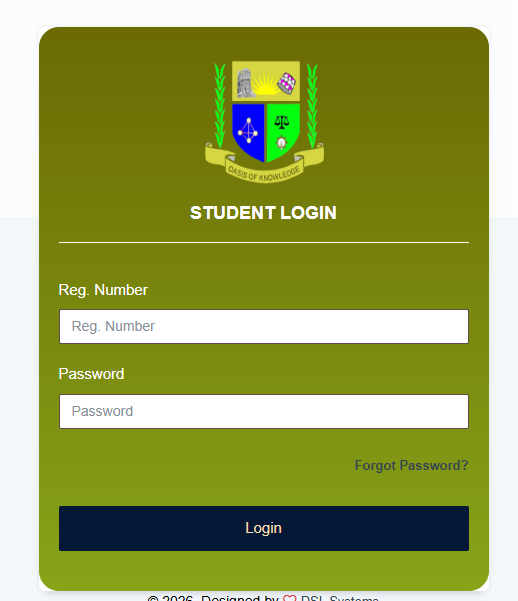
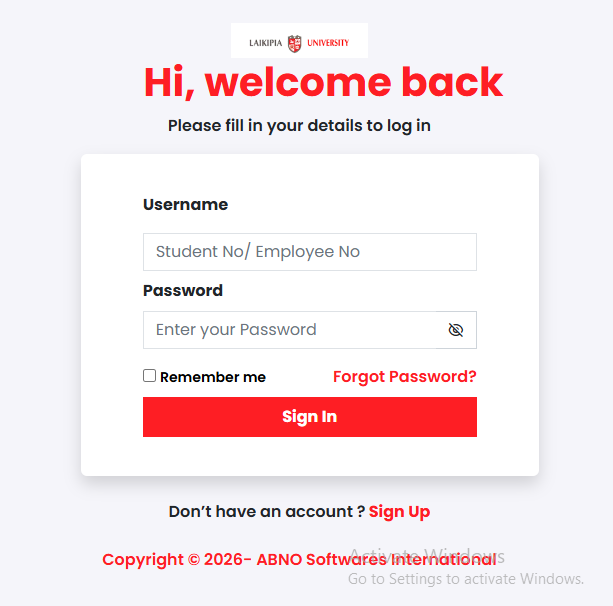
To manage your academic journey at Laikipia University (LU), you must use the official student portal. This platform is the central hub for all student-related activities, from admission to graduation. You can access it via the official link: portal.laikipia.ac.ke.
| Key Feature | Main Use | Requirement |
| Login | Access your student dashboard | Reg Number & Password |
| Unit Registration | Select courses for the semester | Paid Fees & Active Account |
| Fee Statement | View balance and payment history | Student ID |
| Exam Results | Check grades and transcripts | Completed Semester |
Life at Laikipia University is an exciting blend of academic rigor and personal growth. Whether you are studying at the Main Campus in Nyahururu or through the Virtual Campus, managing your records is a daily part of your life. Gone are the days of manual paperwork for every small request. Today, the laikipia university student portal is the most important tool you have.
For many Kenyan students, navigating digital platforms can feel intimidating at first. You might worry about missing a deadline for unit registration or failing to see your fee reflects in the system. This guide is here to help you master the LU portal with ease. We use clear steps and real examples to ensure you stay on top of your studies without the stress of “system errors.” By the end of this, you will know exactly how to handle your account like a pro.
What Is the Laikipia University Student Portal?
The laikipia university student portal is a secure online management system. It allows students to perform administrative tasks without visiting the registrar’s office. It is part of the university’s commitment to digital transformation, ensuring that services are faster and more transparent.
According to reports by Nation Africa, Kenyan universities are increasingly moving toward automated systems to handle the high volume of students. For LU, this portal is where your entire academic history lives.
Core Portal Details
| Service Category | What You Can Do |
| Account Management | Create an account, change passwords, and update personal profiles. |
| Academic Records | Register units, view timetables, and download provisional transcripts. |
| Financial Tracking | Check fee balances and view invoices for each semester. |
| Communication | Receive official notices from the university management. |
Why Kenyans Need the Laikipia University Student Portal
In Kenya, the education sector is evolving. With the help of organizations like the Kenya National Bureau of Statistics (KNBS), we see that more students are accessing education through technology. Here is why the portal is a lifesaver:
-
Saves Money and Time: You don’t need to travel from Nyeri or Nakuru to Nyahururu just to check if your marks are out. You can do it from your phone.
-
Avoids “Missing Marks”: By registering your units early on the portal, you ensure that the system recognizes you for exams.
-
Financial Planning: Parents and students can see exactly what they owe, helping them plan for payments before the exam season starts.
-
Authority and Safety: Since the portal is linked to the university database, the information there is official and legally recognized for credit transfers or job applications.
Types of Services on the Portal
The LU portal isn’t just one page; it has several sections designed for different needs.
1. New Student Account Creation
If you are a first-year student, your first task is to create an account. You will need your Admission Number (e.g., L11/12345/24) and a strong password. This step is mandatory before you can access any other service.
2. Unit Registration Dashboard
This is the most critical section. At the start of every semester, you must “claim” the units you are attending. If you don’t register here, you won’t appear on the class list or the exam attendance sheet.
3. Financial Module
This section tracks every shilling you pay. It shows your tuition fees, activity fees, and any arrears. It is often used to generate “Exam Permits” once your balance is cleared.
How to Access the Laikipia University Student Portal Correctly
To ensure a smooth experience, follow this checklist before logging in:
-
Use a Reliable Browser: Google Chrome or Mozilla Firefox work best. Avoid using outdated browsers.
-
Check Your Internet: A stable connection is needed to prevent errors during unit submission.
-
Clear Browser Cache: If the page isn’t loading, try clearing your history or using “Incognito” mode.
-
Official Link Only: Only use
portal.laikipia.ac.ke. Beware of fake sites that might try to steal your login details.
Costs, Requirements, or Timelines in Kenya
Navigating the university calendar is easier when you know the deadlines. Most activities on the portal follow the official Laikipia University academic calendar.
| Activity | Typical Timeline | Requirement |
| Account Activation | Week 1 of Admission | Admission Letter |
| Unit Registration | Within first 3 weeks | 50% Fee Payment |
| Fee Payment Deadline | Before Exams | 100% Fee Payment |
| Result Viewing | 2-4 weeks after exams | Completed Semester |
If you are looking for a way to manage your social life alongside your studies, you might explore the Best Online Dating Platform in kenya to meet like-minded people.
Step-by-Step Guide: How to Get Started
Follow these simple steps to set up and use your account:
-
Visit the Portal: Go to the LU Portal Page.
-
Sign Up: Click on “Create Account” or “Sign Up” if you are a new user.
-
Enter Details: Type in your Registration Number and create a password (at least 8 characters).
-
Wait for Activation: It usually takes about 5 to 10 minutes for the system to sync your new account.
-
Log In: Enter your Reg Number and the password you just created.
-
Register Units: Go to the ‘Academic’ tab, select ‘Unit Registration,’ and pick the units for your current semester.
-
Save/Print: Always click ‘Submit’ and then print or save a PDF copy of your registration for your records.
Common Mistakes to Avoid
Even experienced students sometimes run into trouble. Here are some mistakes to watch out for:
-
Using Slashes instead of Dashes: The system is picky about formats. If your ID is
L11-123, don’t typeL11/123.-
Solution: Always check your official admission letter for the exact format.
-
-
Forgetting to Submit: Some students select units but never click the final “Submit” button.
-
Solution: Double-check your status; it should say “Registered,” not “Pending.”
-
-
Sharing Passwords: Giving your friend your password “to help you register” is risky.
-
Solution: If you have trouble, visit the ICT department or email
studentsupport@laikipia.ac.ke.
-
-
Ignoring Deadlines: Waiting until the last day when the server is slow.
-
Solution: Complete your registration in the first week of the semester.
-
Future Updates or Trends
Technology in Kenyan universities is moving toward mobile-first experiences. We expect to see more features integrated into the laikipia university student portal, such as:
-
Mobile App Access: A dedicated LU app for instant notifications.
-
AI Support: Chatbots to help students reset passwords without visiting the ICT office.
-
Direct eCitizen Integration: Streamlined payments through eCitizen Kenya for all government-sponsored students.
Quick Poll: How do you usually access the portal?
A) Through my smartphone.
B) Using a laptop or computer.
C) At a cyber cafe.
FAQ Section
How do I reset my portal password?
Go to the portal login page and click “Forgot Password.” Enter your university-assigned email to receive a recovery link. If you haven’t set up your email, visit the ICT section for manual help.
Can I register units before paying fees?
Usually, you must pay at least a certain percentage of your fees (often 50% or as specified by the registrar) before the system allows you to register units for that semester.
Why are my results not showing on the portal?
Results may be hidden if you have an outstanding fee balance or if the lecturer has not yet uploaded them. Confirm with your department if the “Internal Marks” period has closed.
What should I do if my registration number is “Not Found”?
This happens if your records haven’t been fully digitized or if you are typing the format incorrectly. Visit the Admissions Office with your letter to have your details updated in the system.
Is there a separate portal for e-learning?
Yes, Laikipia University uses a Virtual Campus (LMS) for online classes, which is different from the administrative student portal. However, you often use similar credentials to log in.
My Experience
When I first joined Laikipia University, I was worried about the “system.” I heard stories of students who missed their graduations because of missing marks. I decided to take the portal seriously from day one.
I remember one semester when I thought I had registered for a “Common Unit,” but something felt off. I logged back into the laikipia university student portal and saw the unit was still in the “Pending” list. I hadn’t clicked the final confirmation! Because I checked early, I fixed it in seconds. If I had waited until exam time, I would have been turned away from the exam room. This portal is your best friend if you use it regularly. It gives you peace of mind that your records are correct.
Key Takeaways
-
The portal is the official record for your fees, units, and grades.
-
Always use your Registration Number exactly as it appears on your ID.
-
Check the portal at least once a week for updates and notices.
-
Clear your fees early to avoid system lockouts during the exam period.
-
The ICT department is your primary contact for any technical login issues.
Conclusion
Managing your university life doesn’t have to be a struggle. The laikipia university student portal is designed to put you in control. By following the steps in this guide, you can ensure that your academic records are always up to date. Remember, the digital footprint you create now will follow you until graduation, so keep it clean and accurate.
Stay proactive, register your units on time, and keep a close eye on your fee statements. If you found this guide helpful, please share it with your fellow students or leave a comment below with your own portal experiences!
Sources and References
Poll Answers: Most students prefer using their smartphones (A) for quick checks, but laptops (B) are safer for unit registration tasks!