Maseno Student Portal Guide: Login, Registration, and Results (2025/2026)
Introduction
University life moves fast. One minute you are looking for a lecture hall, and the next, you are trying to beat a deadline for course registration. Gone are the days when students had to queue for hours at the administration block just to get a fee balance statement. Technology has changed how we handle academic tasks.
For learners at Maseno University, the maseno student portal is your central hub for everything. It connects you to the administration, finance department, and your lecturers without you needing to leave your room. Whether you are a fresher trying to figure out your admission number or a continuing student checking missing marks, this system is the key.
However, navigating these systems can sometimes be confusing. Servers might be slow, passwords get forgotten, or links change. This guide breaks down exactly how to use the portal, solve common login issues, and manage your campus life smoothly.
What Is Maseno Student Portal?
The maseno student portal is a web-based platform designed to help students access academic and financial services online. Think of it as your digital office. Instead of walking to the registrar, you log in to your account to view your details.
It matters because the university administration uses this system as the primary way to communicate formal records. If your units are not registered on the portal, you technically are not in class, even if you attended every lecture.
Key Features Breakdown
| Feature | Function |
| Academics | Register units, view transcripts, and check exam results. |
| Finance | Check fee balances, generate invoices, and view payment history. |
| Accommodation | Book hostels and room allocation within the university. |
| Admissions | Download admission letters and joining instructions. |
Why Kenyans Need Maseno Student Portal
Digital literacy is growing rapidly in Kenya. According to data from the Kenya National Bureau of Statistics (KNBS), internet access among the youth has spiked, making online education tools essential.
Here is why you need this system:
-
Remote Access: You do not need to travel to Kisumu or the main campus to get administrative help. You can access services from Nairobi, Mombasa, or anywhere with a network.
-
Cost Savings: By checking fee balances online, you save the bus fare you would have spent traveling to the finance office.
-
Instant Feedback: You get immediate confirmation when you register for units or pay fees, unlike manual systems where files can get lost.
-
24/7 Availability: The system does not close at 5:00 PM. You can check your results late at night or over the weekend.
Types or Categories Related to Maseno Student Portal
Maseno University runs a few different online systems. It is easy to mix them up.
The Student Management Information System (MIS)
This is the main maseno student portal. It handles the administrative side of things. You use this for:
-
Course registration
-
Fee statements
-
Hostel booking
-
Exam cards
The e-Learning Portal (LMS)
This is different from the MIS. The Learning Management System (LMS) is for studying. Here, lecturers upload notes, assignments, and conduct online classes. You cannot pay fees here, but you will spend a lot of time here for your actual degree work.
Staff Portal
This is strictly for employees. Students cannot access this area. It allows lecturers to upload marks which then reflect on your student portal.
How to Use or Access Maseno Student Portal Correctly
Getting into the system requires accuracy. A small mistake in typing your admission number will block you.
Prerequisites Checklist:
-
[ ] A stable internet connection.
-
[ ] Your valid Registration/Admission Number (e.g., BA/0000/2024).
-
[ ] Your unique password (default is often your ID number or admission number initially).
-
[ ] A compatible browser (Chrome or Firefox works best).
Steps for First-Time Users:
If you are a new student, you usually need to activate your account.
-
Visit the official university website.
-
Locate the “Student Portal” link.
-
Use the “First time login” or “Create Account” option if available.
-
Enter your admission number precisely.
Costs, Requirements, or Timelines in Kenya
Accessing the maseno student portal is free. The university does not charge you to log in. However, you must be a registered student to have an active account.
Requirements and Deadlines Overview
| Item | Requirement/Cost | Timeline/Deadline |
| Portal Access | Free | 24/7 throughout the semester |
| Unit Registration | Paid Tuition Fees (Zero balance or threshold met) | First 4 weeks of the semester |
| Exam Card | Fee clearance | 2 weeks before exams start |
| Hostel Booking | Booking Fee (varies by room) | Start of the semester (First come, first served) |
Note: Deadlines are strict. Missing the unit registration deadline often attracts a penalty.
Step-by-Step Guide: How to Get Started
Follow this logical flow to log in without issues.
-
Open Your Browser: Use a reliable browser on your phone or computer.
-
Go to the Address Bar: Type in the official Maseno University URL. Look for the specific subdomain usually labeled
student.maseno.ac.keor similar. -
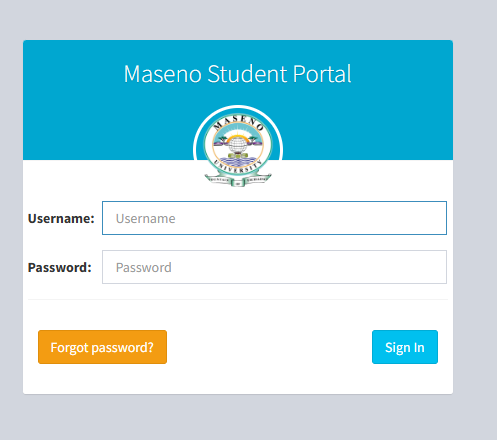
Locate the Login Box: You will see fields for a username and password.
-
Enter Credentials:
-
Username: Type your Admission Number exactly as it appears on your letter (include the slashes).
-
Password: Enter your secret password.
-
-
Click Login: Press the sign-in button.
-
Dashboard View: Once inside, you will see your photo and a menu on the left side containing “Academics,” “Finance,” and “Hostels.”
Common Mistakes to Avoid
Students often face challenges because of simple errors.
-
Using the Wrong Slash: Some students type a backslash (
\) instead of a forward slash (/) in their admission number. Always use the forward slash. -
Sharing Passwords: Never share your login details. Friends can accidentally (or intentionally) deregister your units.
-
Waiting Until the Last Minute: Trying to register when thousands of others are doing the same crashes the server. Do it early.
-
Ignoring Browser Cache: If you cannot log in, try clearing your browser history. Old data sometimes confuses the login page.
Future Updates or Trends
Universities in Kenya are modernizing. We see a shift toward more integrated systems. According to trends noted by TechCrunch Africa, educational institutions are adopting mobile-first approaches.
We expect the maseno student portal to soon integrate:
-
Biometric Login: Using fingerprints or face ID on mobile apps for better security.
-
Mobile App Integration: A dedicated app so you don’t have to use a browser.
-
Direct Link to HELB: Real-time updates on your loan status directly on the school portal.
Quick Poll:
Which feature would help you the most?
A) A mobile app for the portal
B) Faster loading speeds
C) Real-time chat support
(Answer A, B, or C in the comments below)
FAQ Section
How do I reset my Maseno Student Portal password?
Click on the “Forgot Password” link on the login page. You will typically be asked to enter your admission number. A reset link or code will be sent to the email address you registered with the university.
Why is my portal showing “Invalid Login”?
This usually happens if you type the admission number with the wrong format (wrong slashes) or if you have forgotten your password. It can also happen if the system is undergoing maintenance.
Can I check my fee balance on the portal?
Yes. Log in and navigate to the “Finance” or “Student Finance” section. You can view your detailed fee statement and current balance there.
How do I register units on the Maseno portal?
Go to the “Academics” section after logging in. Select “Course Registration.” Tick the units you are taking this semester and click “Submit” or “Register.” Ensure you print the registration slip as proof.
My Experience
I remember my second year at university when the maseno student portal server went down two days before the exam card deadline. It was stressful. I had waited until the last minute because I assumed the system would always be perfect. I learned a hard lesson that day.
Since then, I always advise students to register for units at the very beginning of the semester. Using the portal is straightforward if you are organized. I also found that accessing the portal very early in the morning (around 5:00 AM) is much faster because fewer people are online. The peace of mind you get from having your exam card ready weeks in advance is worth the early wake-up call.
Also, while university life is heavily focused on academics, do not forget to build a social life. If you are looking to meet new people outside your classes, you might check out the Best Online Dating Platform in kenya to expand your circle. Balancing studies with a healthy social life is key to surviving campus.
Key Takeaways
-
Accuracy Matters: Type your admission number exactly as it appears on your ID card.
-
Deadlines are Real: The portal closes for registration automatically. Do not rely on extensions.
-
Security: Keep your password private and change it regularly.
-
Verification: Always print your exam card and registration slip for physical proof.
Conclusion
The maseno student portal is a powerful tool designed to make your campus life easier. By understanding how to log in, register for courses, and troubleshoot common issues, you take control of your academic journey. Do not let technical glitches slow you down.
Start your semester on the right foot. Log in today, check your status, and ensure everything is in order.
Have you experienced issues with the portal recently? Share your questions or tips in the comments below, and let us help each other navigate campus life.
Sources and References
-
Nation Africa – Education News and University Updates.
-
eCitizen Kenya – Government Services and ID information.
-
Kenya National Bureau of Statistics (KNBS) – Data on internet usage in Kenya.
-
TechCrunch Africa – Trends in African Educational Technology.
-
HubSpot Blog – Information on digital user experience.
-
Forbes – Insights on the future of remote learning.
-
Business Daily Africa – Reports on higher education financing.
-
Statista – Statistics on mobile penetration in Africa.
-
Entrepreneur – Articles on productivity for students.
-
Kenya Revenue Authority (KRA) – Tax compliance for student businesses.