Meru National Polytechnic Student Portal: Complete Login Guide and Services for 2026
Introduction
Picture this: it’s 11 PM and you suddenly remember you need to confirm your course registration before tomorrow’s deadline. Or maybe you just finished your exams and can’t sleep wondering if your results are out. In the past, these situations meant waiting until morning and rushing to the administration block. Not anymore.
The Meru National Polytechnic student portal has changed how students interact with the institution. Located in Meru County along the Meru-Nanyuki Highway, this institution serves thousands of students each year through its various technical programs. The portal, accessible at portal.mnp.ac.ke, brings every service you need to your fingertips. From checking exam results at midnight to booking hostel rooms during semester breaks, this digital platform makes student life smoother and more convenient for everyone enrolled at MNP.
What Is Meru National Polytechnic Student Portal?
The Meru National Polytechnic student portal is an online platform where students access academic and administrative services using their login credentials. It works as your digital connection to the institution, available whenever you need it.
This web-based system allows students to handle tasks that once required physical visits to various offices. Whether you’re at home, in town, or anywhere with internet access, the portal keeps you connected to your academic journey at MNP.
| Portal Detail | Information |
|---|---|
| Official URL | portal.mnp.ac.ke |
| Access Hours | 24/7 (except during scheduled maintenance) |
| Login Method | Student Number + Password |
| Developer | ABNO Softwares International |
| Support Email | registrar@merunationalpolytechnic.ac.ke |
| Customer Care | +254 71 791 4884 |
| Alternative Email | info@merunationalpolytechnic.ac.ke |
The portal integrates with the institution’s main database, meaning information updates in real time. When the finance office processes your fee payment, the portal reflects this immediately. When lecturers submit exam marks, you can view them as soon as they’re approved.
Why Kenyans Need Meru National Polytechnic Student Portal
Students and parents benefit from this digital platform in multiple ways:
- Round-the-Clock Service Access: Check your fee balance, exam results, or timetable at any hour without waiting for office hours to begin.
- Saves Transportation Costs: Students living away from campus avoid unnecessary trips just to collect simple information or documents.
- Instant Result Notifications: Know your exam performance immediately after release instead of traveling to campus to check notice boards.
- Transparent Fee Management: View exactly what you’ve paid, what remains, and upcoming deadlines without confusion or disputes.
- Efficient Course Registration: Select and register for your semester courses from home during the registration window.
- Digital Documentation: Download admission letters, fee receipts, and other official documents instantly for job applications or scholarship submissions.
- Hostel Booking Convenience: Reserve accommodation from anywhere once the booking system opens, competing fairly for available spaces.
- E-Learning Integration: Access the institution’s e-learning platform at elearn.mnp.ac.ke through the same login system.
- Assignment Submission: Submit coursework and assignments digitally, reducing paper use and ensuring timely delivery.
According to Statista, the global digital education market is projected to reach USD 400 billion by 2026, reflecting how institutions worldwide are moving toward online platforms. MNP’s portal aligns with this trend and Kenya’s Vision 2030 digital education goals.
Types of Services Available on Meru National Polytechnic Student Portal
Academic Services
The academic section forms the core of what students need daily. Here you’ll find your registered courses for the current semester, showing course codes, titles, credits, and assigned lecturers. The system also displays your academic timetable with class times, venues, and any changes announced by departments.
Internal marks submitted by lecturers appear here throughout the semester, helping you track your progress before final exams. Past examination papers are available for download, giving you valuable revision materials.
Financial Services
Money matters become transparent through this section. The portal shows your complete fee structure based on your program level, whether diploma, certificate, or craft training. All payments you’ve made appear with dates, reference numbers, and amounts.
Your current balance updates automatically when the finance office processes payments. You can also generate and print official fee statements for scholarship applications or student loan processing with Higher Education Loans Board.
Examination Services
Before sitting for end-of-semester exams, you must download your exam card from the portal. This card serves as your admission ticket to the examination room. The system won’t generate your card if you have outstanding fee balances or haven’t met attendance requirements.
After exams, results post here first before physical notice boards. You can check your grades for each unit, calculate your GPA, and view your academic transcript showing all semesters.
Hostel and Accommodation Services
MNP operates 10 hostels: 5 for men and 5 for women. The portal’s hostel booking system opens before each semester begins. Students can view available rooms, select their preferred hostel and room number, and make reservations online.
The system works on a first-come, first-served basis, making it fair for everyone. Once you book, you must pay the accommodation fee through the institution’s bank accounts to confirm your space.
E-Learning Platform Access
The portal links directly to MNP’s e-learning system at elearn.mnp.ac.ke. Your portal login credentials work on both platforms. Through e-learning, you access lecture notes, video tutorials, online quizzes, and discussion forums with classmates and lecturers.
Student Council and Activities
Stay updated on student government activities, elections, and campus events. The portal posts announcements about sports competitions, cultural festivals, and other co-curricular activities organized by the student council.
Library Services
Access the library’s digital catalog, check your borrowed books, view due dates, and renew loans without visiting the physical library. Some academic databases and journals are also accessible through this section.
How to Use Meru National Polytechnic Student Portal Correctly
Follow this practical checklist to maximize your portal experience:
Before Creating Your Account:
- Ensure you have your official admission letter with your student number
- Have a working email address that you check regularly
- Keep your ID number or birth certificate number handy
- Use a reliable internet connection to avoid interruptions during registration
Security Practices:
- Never share your login credentials with anyone, including close friends
- Choose a strong password mixing uppercase letters, lowercase letters, numbers, and symbols
- Change your password every few months for better security
- Always log out completely after finishing, especially on shared computers
- Clear browser history and cache when using cyber cafes or public computers
Regular Usage Habits:
- Log in at least twice weekly to catch important announcements
- Check the portal before visiting campus offices to see if you can complete tasks online
- Save or screenshot important information like fee receipts and exam cards
- Verify your course registration within the first week of every semester
- Update your contact information promptly if your phone number or email changes
Getting Help:
- Contact customer care at +254 71 791 4884 for urgent login issues
- Email registrar@merunationalpolytechnic.ac.ke for academic queries
- Visit the IT department on campus for password resets requiring physical verification
- Watch the official video tutorial at the institution’s YouTube channel for visual guidance
Costs, Requirements, and Timelines in Kenya
| Fee Item | Amount (Kshs) | When Payable |
|---|---|---|
| Annual Tuition Fee | 67,189 | Split across two terms |
| Term 1 Tuition | 35,220 | Beginning of Term 1 |
| Term 2 Tuition | 31,969 | Beginning of Term 2 |
| Admission Fee | 500 | Once during first enrollment |
| KUCCPS Placement Fee | 1,500 | For government-sponsored students |
| Student ID Card | 200 | Once during admission |
| Hostel Fee (per term) | 3,500 | Start of each term (reduced from 5,500) |
| Examination Fee | Varies | Before exams each semester |
| Activity Fee | 4,514 | Annually |
| Medical & Insurance | 2,000 | Annually |
Payment Methods:
- Banker’s cheque payable to Meru National Polytechnic
- Money order addressed to the institution
- Direct bank deposit to MNP’s official bank accounts
- M-Pesa payments to the institution’s paybill number
Important Timelines:
- Admission Intakes: January, May, and August each year
- Portal Account Creation: Within first week of reporting
- Course Registration Period: First three weeks of semester
- Fee Payment Deadline: Before course registration deadline
- Hostel Booking Window: Opens one month before semester begins
- Exam Results Release: Typically 4-6 weeks after examinations
- Appeal Period: Two weeks after results release
The government provides funding through the new Higher Education Fund to subsidize fees for qualifying students. Those who applied through KUCCPS receive varying amounts based on their household income assessment.
Step-by-Step Guide: How to Create Your Account and Login
Creating Your Portal Account (New Students)
Step 1: Fill the Pre-Registration Form
Before accessing the main portal, new students must submit their details through a Google Form link provided by the institution. Visit the student affairs page at mnp.ac.ke/index.php/student-affairs and look for the pre-registration form link.
Step 2: Gather Required Information
Prepare your student admission number from your admission letter, your National ID number or birth certificate number, your phone number, and your email address. Have all these details ready before starting.
Step 3: Access the Portal Homepage
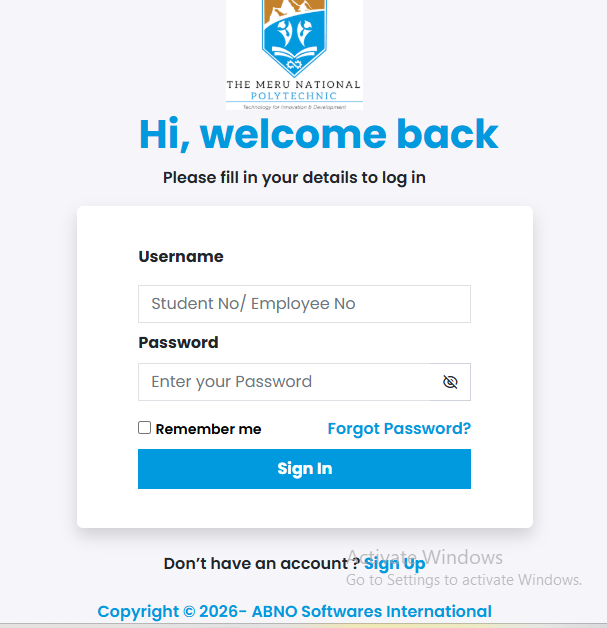
Open your web browser and type portal.mnp.ac.ke in the address bar. The login page should load showing the MNP logo and login fields.
Step 4: Click “Sign Up” or “Create Account”
Look for the registration link, usually labeled “Sign Up,” “Create Account,” or “New Student Registration.” Click this link to begin creating your portal account.
Step 5: Enter Your Details
Fill in all required fields accurately. Enter your student admission number exactly as shown on your admission letter. Choose a strong password that you’ll remember but others can’t guess easily.
Step 6: Submit and Verify
Click the submit button after filling all fields. The system may send a verification email to the address you provided. Check your inbox (and spam folder) for this email.
Step 7: Activate Your Account
Click the activation link in the verification email. This confirms your email address and activates your portal account.
Step 8: Complete Your Profile
Log in with your new credentials and complete your student profile. Add your next of kin details, current address, and any other required information.
Logging Into Your Portal Account
Step 1: Visit portal.mnp.ac.ke
Open your browser and navigate to the portal homepage. Bookmark this page for quick access in the future.
Step 2: Enter Your Username
In the username or student number field, type your complete student admission number. Some portals use just the number, while others include the prefix letters.
Step 3: Enter Your Password
Type the password you created during registration. Remember that passwords are case-sensitive, so check your caps lock key.
Step 4: Click Login
Press the “Login” or “Sign In” button. Wait a few seconds while the system verifies your credentials.
Step 5: Access Your Dashboard
Once logged in, you’ll see your student dashboard with various menu options. Take time to explore each section and familiarize yourself with available features.
Step 6: Perform Your Tasks
Navigate to whichever service you need, whether checking results, registering courses, or viewing your fee statement.
Step 7: Log Out Properly
When finished, find the “Logout” button (usually in the top right corner) and click it. Never just close the browser without logging out, especially on shared computers.
Resetting a Forgotten Password
Step 1: Go to portal.mnp.ac.ke
Step 2: Look for “Forgot Password” link below the login button
Step 3: Click the link and enter your student admission number
Step 4: Provide the email address you used during registration
Step 5: Click “Submit” or “Send Reset Link”
Step 6: Check your email inbox for password reset instructions
Step 7: Click the reset link (valid for 24 hours only)
Step 8: Create your new password following the strength requirements
Step 9: Confirm the new password by typing it again
Step 10: Return to the login page and sign in with your new password
If you don’t receive the reset email within 10 minutes, check your spam folder. Still having issues? Visit the IT department on campus with your student ID card for manual password reset.
Common Mistakes to Avoid
Mistake 1: Using Incorrect Login Credentials
Many students try logging in with their KCSE index number or birth certificate number after they’ve already created a custom password. Your portal username is always your student admission number.
Solution: Double-check your admission letter for the exact student number format. If you created a custom password during registration, use that password, not your ID number.
Mistake 2: Not Booking Hostel Early Enough
Students wait until the last day to book accommodation, only to find all spaces taken. The system operates on first-come, first-served basis.
Solution: Set a reminder on your phone for when hostel booking opens. Complete your booking within the first three days of the window opening.
Mistake 3: Deleting Payment Confirmation Messages
Some students delete M-Pesa messages or lose bank deposit slips, making it difficult to verify payments when the portal shows incorrect balances.
Solution: Screenshot every payment confirmation immediately. Email these screenshots to yourself or save them in a dedicated phone folder labeled “MNP Fees.”
Mistake 4: Ignoring Course Registration Deadlines
Students assume they have unlimited time to register for courses, then miss deadlines and face late registration penalties or even being locked out of exams.
Solution: Register for courses in the first week of the semester. Mark the deadline in your phone calendar with multiple reminders starting one week before.
Mistake 5: Not Reading Portal Announcements
Important notices about exam schedules, fee deadlines, or system maintenance appear on the portal, but students who log in quickly to check one thing miss these updates.
Solution: Always check the announcements section before logging out. Read all notices posted in the past week, even if they seem unrelated to your immediate need.
Mistake 6: Sharing Portal Access
Friends ask to “just check one thing” using your account, compromising your security and potentially allowing them to see your personal academic and financial information.
Solution: Never give out your password. If someone needs to check something, log in yourself and show them the screen, or direct them to create their own account or visit the relevant office.
Future Updates and Trends for TVET Student Portals in Kenya
Kenya’s TVET sector is experiencing major digital transformation under government initiatives. The TVET Authority has been working with national polytechnics to standardize student management systems across all public institutions.
Expected improvements for MNP’s portal include a dedicated mobile application for Android and iOS devices, allowing students to receive push notifications for important updates. The institution may also integrate direct M-Pesa payment functionality, letting students pay fees through the portal without visiting banks.
Artificial intelligence chatbots could soon answer common student questions 24/7, reducing the workload on customer care staff. Biometric authentication using fingerprints or facial recognition might replace traditional passwords for enhanced security.
According to Business Daily Africa, Kenya plans to have all public training institutions fully digitized by 2026. This includes blockchain-verified academic certificates that employers can verify instantly online, eliminating certificate fraud.
The government’s push for 100 percent transition from basic education to tertiary training means TVET institutions will see significantly more students. Portals must become more robust to handle peak traffic during registration periods without crashes or slowdowns.
Integration with eCitizen Kenya services may allow students to access government services like ID replacement or police clearance certificates through their student portal, creating a one-stop digital hub.
Quick Poll Question:
Which portal improvement would help you most as a student? A) Mobile app with push notifications B) Integrated M-Pesa fee payment C) 24/7 AI chatbot support D) Biometric login instead of passwords
(Answer: While all improvements would benefit students, surveys across Kenyan institutions show mobile apps consistently rank highest because most students access services via smartphones rather than computers, and push notifications ensure they never miss important deadlines.)
Frequently Asked Questions
Q: Can I access the Meru National Polytechnic student portal from my phone?
Yes, the portal works on any smartphone browser. Simply open Chrome, Firefox, Safari, or any other browser app on your phone and visit portal.mnp.ac.ke. The interface is mobile-responsive, meaning it adjusts to fit your screen size. However, some features work better on larger screens, so consider using a computer for tasks like downloading detailed transcripts or filling complex forms.
Q: What should I do if the portal says my password is incorrect?
First, verify you’re typing the correct password with proper capitalization and no extra spaces. If you’re certain the password is correct, use the “Forgot Password” function to reset it. For first-time users who haven’t changed their password yet, try your ID number or birth certificate number. If nothing works, contact customer care at +254 71 791 4884 or visit the IT department on campus with your student ID card.
Q: How long after making a fee payment will it reflect on the portal?
The finance office typically updates portal records within 24-48 hours after receiving payment confirmation. If your payment doesn’t appear after two working days, visit the finance office with your payment slip or M-Pesa message. They’ll verify the payment and update the system manually if necessary. Always keep payment proof until you confirm the portal shows the correct amount.
Q: Can I change my course registration after submitting it?
Course changes are possible during the add/drop period, usually the first two weeks of the semester. Log into the portal, go to course registration, and look for “Modify Registration” or “Add/Drop Courses.” Some changes require departmental approval, especially if you’re dropping a core course or adding one with prerequisites. After the add/drop deadline, changes become very difficult and may require special permission from the dean.
Q: Why can’t I download my exam card even though I paid my fees?
Several reasons could prevent exam card generation. First, check that your payment has reflected on the portal under your fee statement. Second, verify you’ve registered for courses for the current semester. Third, confirm you meet the attendance requirement (usually 75-80 percent of classes). Fourth, check if you have any library books overdue or equipment borrowed from departments. The portal won’t generate exam cards until all requirements are met.
Q: Is there a way to check my portal from the e-learning platform?
Yes, the portal and e-learning system at elearn.mnp.ac.ke are integrated. Your login credentials work on both platforms. You can access your main portal dashboard from within the e-learning site by clicking the appropriate link in the menu. This integration makes it convenient to check your exam schedule or fee balance while working on e-learning assignments without needing to switch sites constantly.
My Experience with TVET Student Portals
I remember my first semester at a technical institution before comprehensive portals existed. Registration meant standing in multiple queues across different offices for hours, sometimes days. You’d queue at the registrar’s office to pick registration forms, then at each department to get course approval signatures, then back to the registrar to submit everything.
Checking exam results was even more stressful. Results posted on physical notice boards, and students would crowd around, pushing and shoving to see their names. If you lived off-campus, you’d make a special trip just to check the board, only to sometimes find results weren’t posted yet.
When my institution finally launched a student portal in my third year, skeptics said it would complicate things. They were wrong. Within one month, I was checking results from my phone at home, registering for courses while having lunch, and viewing my fee balance during work breaks at my part-time job.
The biggest advantage I found was financial transparency. Before the portal, the finance office occasionally lost payment records, leading to disputes about what students had paid. With the portal showing every transaction with dates and reference numbers, these disputes disappeared. I would screenshot my fee statement weekly, creating an undisputable record of my payments.
One semester, my exam marks for Electrical Installation appeared wrong on the portal—showing 30 percent when I knew I’d performed much better. In the old system, this would have required multiple office visits and weeks of following up. Through the portal’s inquiry system, I flagged the error, attached my exam card, and within three days, the lecturer reviewed and corrected the marks to 78 percent.
My advice to current students: treat your portal account as seriously as your bank account. It contains equally sensitive information about your academic journey and financial records. Learn all its features during your first week, not when you’re in a panic one day before an important deadline.
For students looking to connect with peers and build professional networks early, platforms like Best Online Dating Platform in Kenya offer opportunities to meet other young Kenyans navigating education and career paths.
Key Takeaways
- The Meru National Polytechnic student portal operates 24/7 at portal.mnp.ac.ke for all academic and administrative services
- Login requires your student admission number as username and either your chosen password or ID number for first-time users
- Annual tuition costs Kshs 67,189 payable in two terms, plus additional fees for admission, hostel, and student services
- The portal provides course registration, exam results, fee statements, hostel booking, e-learning access, and document downloads
- New students must complete pre-registration through a Google Form before creating portal accounts
- Common mistakes include using wrong credentials, missing deadlines, deleting payment proofs, and sharing passwords
- Password recovery is available through the “Forgot Password” link with reset instructions sent to registered email
- Hostel allocation works on first-come, first-served basis, so book early when the window opens
- Contact support at +254 71 791 4884 or registrar@merunationalpolytechnic.ac.ke for technical assistance
- Future improvements may include mobile apps, integrated payments, AI support, and biometric authentication
- Keep all payment receipts and screenshots until confirmed on the portal to avoid disputes
- Portal access integrates with the e-learning platform at elearn.mnp.ac.ke using the same login credentials
Conclusion
The Meru National Polytechnic student portal represents a significant leap forward in making technical education more accessible and efficient. By mastering this digital platform, you gain control over your academic journey without depending on office hours, long queues, or physical campus visits.
Whether you’re a prospective student researching MNP or a current student struggling with portal navigation, the key is consistent usage. Don’t wait until you desperately need information to familiarize yourself with the system. Log in regularly, explore every section, and bookmark important pages for quick access.
Remember that technology sometimes fails. Servers experience downtime, internet connections drop, and systems undergo maintenance. Always maintain backup plans for critical deadlines. Screenshot important documents, keep physical copies of essential papers, and maintain good communication with relevant departments.
The portal works best when you stay proactive. Register for courses early, check announcements frequently, verify fee payments immediately, and address any discrepancies the moment you notice them. Reactive students who only check the portal when problems arise miss opportunities and create unnecessary stress for themselves.
What challenges have you faced using the Meru National Polytechnic student portal? Have you discovered helpful features or workarounds that other students should know? Share your experiences in the comments below. Your insights could help fellow students overcome similar obstacles.
If this guide helped you understand the portal better, bookmark it for future reference and share it with classmates who might be struggling. Together, we can help every MNP student make the most of this powerful digital tool.