How to Access the MKU Student Portal Fast
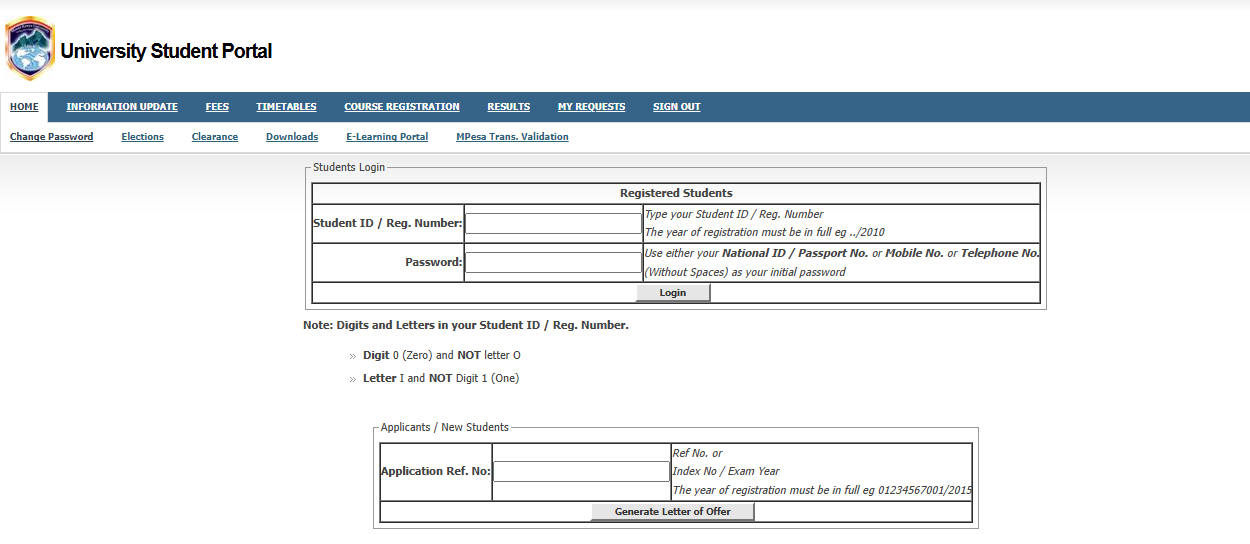
To access the mku student portal, go to the official website at studentportal.mku.ac.ke. Log in by entering your Student ID (Admission Number) as your username. For first-time users, your initial password is usually your National ID number, Passport number, or the Mobile number you provided during admission (without spaces). Once logged in, you can register for units, check semester results, and view your fee statement.
Introduction
University life in Kenya has changed. Gone are the days when you had to stand in long queues at the Ruaraka or Thika Main Campus just to check your grades or confirm if your fee payment was received. Today, everything happens online.
For students at Mount Kenya University (MKU), the mku student portal is the heart of your academic journey. Whether you are a “freshie” just starting your first semester or a final-year student preparing for graduation, this portal is where you manage your life. However, we know that technology can sometimes be frustrating. Maybe you forgot your password, or perhaps the page won’t load right when you want to check your Continuous Assessment Test (CAT) marks.
This guide is written for you—the Kenyan student. It uses simple language to help you navigate the system like a pro, save time, and focus on what really matters: your studies.
What Is MKU Student Portal?
The mku student portal is a secure online platform designed by Mount Kenya University to give students 24/7 access to academic and administrative services. It acts as a digital office where you can handle almost everything without visiting a physical department.
In Kenya, where many students balance work and school, having a reliable portal is a lifesaver. It allows for “blended learning,” where you can be anywhere in the country—from the busy streets of Nairobi to the quiet hills of Eldoret—and still stay on top of your coursework.
Key Details of the MKU Portal
| Feature | Details |
| Official Portal URL | studentportal.mku.ac.ke |
| Login Username | Student Registration Number (e.g., BBM/2024/0000) |
| Initial Password | National ID / Passport / Phone Number |
| Secondary Portal | VLMS (Virtual Learning Management System) |
| Support Email | missupport@mku.ac.ke |
Why Kenyans Need MKU Student Portal
Modern education in Kenya requires speed and efficiency. The portal isn’t just a “luxury”; it is a tool for survival and success.
-
No More Queues: You can register for your units from your house or a cyber café, saving you from the “Thika Road traffic” or long lines at the registrar’s office.
-
Instant Result Access: As soon as the Senate approves grades, you can see them on your phone. This helps you plan for supplementaries or retakes immediately.
-
Financial Tracking: You can see exactly how much you have paid and your current balance. This is crucial for students who rely on Higher Education Loans Board (HELB) or bursaries.
-
Official Communication: Important announcements about exam dates, graduation lists, and fee deadlines are posted here first.
Types or Categories Related to MKU Student Portal
MKU uses a few different digital systems. It is easy to get confused, so let’s break them down.
1. The Main Student Portal (ERP/ESS)
This is for administrative tasks. This is where you go for unit registration, fee statements, and checking your official transcripts. It uses the “Enterprise Resource Planning” (ERP) system to keep your records safe.
2. The Virtual Learning Management System (VLMS)
The VLMS is where the actual “class” happens for online and distance learning students. If you need to download lecture notes, attend a live Zoom class, or submit an assignment, you go to vlms.mku.ac.ke.
3. The Student Email Portal
Every student gets an official university email (e.g., username@student.mku.ac.ke). This email is required to access university Wi-Fi and receive official newsletters. You can set this up through the MKU Student Email Retrieval portal.
How to Use or Access MKU Student Portal Correctly
Accessing the portal correctly prevents your account from being locked. Follow this checklist before you try to log in.
Preparation Checklist:
-
[ ] Stable Internet: Ensure you have at least 5MB of data or a stable Wi-Fi connection.
-
[ ] Correct URL: Always use the official “ac.ke” link to avoid phishing sites.
-
[ ] Updated Browser: Use Google Chrome or Mozilla Firefox. Avoid “Opera Mini” for registration as it sometimes fails to load the forms.
-
[ ] Registration Number: Know your full admission number, including the slashes (/).
Costs, Requirements, or Timelines in Kenya
Using the mku student portal itself is free. You don’t pay a monthly fee to log in. However, your access depends on your registration status and fee payment.
Requirement and Timeline Table
| Activity | Requirement | Typical Timeline |
| Unit Registration | Pay at least 50% of tuition fees | Within first 3 weeks of the semester |
| Checking Results | Zero fee balance (usually) | End of semester (after Senate approval) |
| Exam Card Printing | Full unit registration & fee clearance | 2 weeks before exams begin |
| Password Reset | Registered email or ICT support | Instant (Online) or 24hrs (Support) |
Step-by-Step Guide: How to Get Started
If you are a new student, here is the exact path to getting your portal active.
-
Visit the Site: Open your browser and go to studentportal.mku.ac.ke.
-
Enter Username: Your username is your Admission Number. Note: Use the digit “0” (Zero) and not the letter “O”.
-
Enter Password: For first-timers, try your National ID number. If that doesn’t work, try the phone number you used during application.
-
Update Your Profile: Once inside, click on “Information Update.” Fill in your current phone number and personal email.
-
Create Student Email: Follow the prompts to create your official university email. This is vital for your Wi-Fi access on campus.
-
Register Units: Go to the “Course Registration” tab. Enter the course codes provided in your department’s timetable and click “Confirm.”
Common Mistakes to Avoid
-
Using Letter ‘O’ instead of Zero ‘0’: This is the most common reason for “Login Failed” errors.
-
Saving Passwords on Public Computers: If you use a cyber café, never click “Remember Password.” Always log out and close the browser before leaving.
-
Missing Registration Deadlines: If you don’t register units on the mku student portal, you won’t appear on the class list or the exam list.
-
Ignoring the “Provisional” Tag: Results are often marked as “Provisional” until they are confirmed. Don’t panic if they change slightly after final audit.
Future Updates or Trends
MKU is moving toward a more mobile-friendly experience. We expect the university to launch a dedicated mobile app that integrates the portal with the library system soon.
According to digital trends reported by TechCrunch Africa, more Kenyan universities are adopting AI to help students with common questions. MKU is likely to introduce an AI chatbot on the portal to help with password resets and fee inquiries in real-time.
Quick Poll:
Which feature of the student portal do you use the most?
A) Checking Exam Results
B) Unit Registration
C) Fee Statements/Payment Validation
D) Accessing E-learning (VLMS)
(Share your choice in the comments!)
FAQ Section
Q: How do I reset my MKU portal password if I forget it?
A: Click the “Reset Password” link on the login page. You will be asked for your Student ID and your registered email address. A reset link will be sent to you. If you can’t access that email, send a request to missupport@mku.ac.ke with your ID number and a copy of your National ID.
Q: Why are my exam results not showing?
A: This usually happens if you have an outstanding fee balance or if you didn’t successfully register for that specific unit at the start of the semester. Check your “Fee Statement” first.
Q: Can I pay my fees through the portal?
A: You can’t pay directly with a credit card inside the portal yet, but you can find the M-Pesa Paybill number and your unique account number there. Once you pay via M-Pesa, you can use the “Mpesa Trans. Validation” tab to update your records instantly.
Q: Is the portal accessible on a smartphone?
A: Yes. However, for complex tasks like “Course Registration,” it is better to use a laptop or a tablet to ensure you see all the dropdown menus correctly.
My Experience
When I first joined campus, I thought I could handle everything at the finance office. I spent a whole Tuesday standing in the sun, only to be told that I should have updated my details on the mku student portal first. It was a frustrating lesson.
Since then, I have learned to do everything online at night when the servers are fast. I remember one time my “Exam Card” wouldn’t print. I panicked, thinking I would miss my papers. I reached out to the ICT support team, and they cleared a small system glitch for me within hours. My advice? Don’t wait until the last minute. The portal is your friend, but only if you use it early.
Outside of studies, I’ve found that staying connected digitally is a part of our Kenyan culture now. Whether you’re looking for academic help or even searching for the Best Online Dating Platform in kenya, the internet is where we live. Just make sure you balance your social life with your portal deadlines!
Key Takeaways
-
Login Details: Username is your Admission No; Password is your ID/Phone No for the first time.
-
Timing: Always register units within the first three weeks of the semester.
-
Validation: Use the portal to validate M-Pesa payments so you don’t have to carry paper receipts.
-
VLMS vs Portal: Use the portal for admin/results and VLMS for notes/assignments.
-
Security: Keep your password private and change it every few months.
Conclusion
The mku student portal is a powerful tool that puts you in control of your education. From the moment you receive your admission letter to the day you wear your graduation gown, this system will be your most important companion. By understanding how to log in, register, and check your progress, you avoid unnecessary stress and focus on achieving your academic goals.
Stay updated with news from the Kenya National Bureau of Statistics (KNBS) regarding education trends and keep an eye on Business Daily Africa for any changes in the Kenyan higher education sector.
Do you have any questions about your portal access? Or maybe you found a shortcut that others should know about? Leave a comment below—we would love to hear from you!
Sources and References
-
Kenya Revenue Authority (KRA) (for student tax compliance/PIN details)
-
eCitizen Kenya (for official document verification)
Poll Answer Key: There is no “wrong” answer, but most students select A during exam season and B at the start of the year!