MMUST Student Portal: Complete Guide to Login, Results, and Admission (2025/2026)
Introduction
Starting university is a massive milestone. Whether you are a fresh prompt (“fresher”) joining Masinde Muliro University of Science and Technology (MMUST) or a continuing student trying to sort out your semester units, handling the administrative side of campus life can feel overwhelming. Nobody likes standing in long queues at the finance or admissions office just to get a simple signature.
That is where the MMUST student portal comes in. It is designed to make your academic life easier by putting control in your hands. Instead of running around Kakamega looking for administrative help, you can sort out your fees, exams, and hostel booking right from your phone or laptop.
I have seen many students get frustrated because they lost their password or did not know how to register for units on time. This guide breaks down everything you need to know about the system so you can focus on your studies and campus life.
What Is the MMUST Student Portal?
The MMUST student portal is the official online system that connects students to the university administration. Think of it as your digital student ID and office. It is a secure website where the university keeps your academic records, financial statements, and personal details.
For any student at Masinde Muliro University, this platform is not optional. You use it for almost every official activity, from the moment you receive your admission letter until the day you graduate.
Here is a quick snapshot of what the platform handles:
| Feature | Description |
| Primary URL | portal.mmust.ac.ke |
| Main Users | Students, Staff, and Administrators |
| Key Function | Unit registration, fee payment, exam results |
| Accessibility | 24/7 via Internet |
Why Kenyans Need the MMUST Student Portal
In the past, students had to physically travel to the main campus in Kakamega for simple tasks. Now, the system saves time and money. Here is why every student relies on it:
-
Remote Unit Registration: You do not need to be on campus to select your courses for the semester. You can do it from home before opening day.
-
Instant Fee Balance Checks: Parents and guardians often want proof of fee balances. You can print a fee statement directly from the system.
-
Exam Results: No more checking notice boards. Your provisional and final transcripts are uploaded directly to your account.
-
Hostel Booking: Accommodation within the university is limited. The portal allows you to book a room on a first-come, first-served basis.
-
HELB Updates: The system often reflects when Higher Education Loans Board (HELB) funds have been remitted to your fee account.
Types of MMUST Online Systems
It is easy to confuse the different websites used by the university. To avoid logging into the wrong place, here is the difference between the main systems.
1. The Main Student Portal
This is the administrative hub. You use this for money, marks, and registration. If you need to see your fee structure or register for a retake, this is where you go. It is the focus of this guide.
2. The E-Learning Portal (ODEL)
This is for academics. If you are taking online classes, submitting assignments, or downloading lecture notes, you will use the E-Learning (Moodle) system. It requires a different login process, though often linked to your registration number.
3. Staff Portal
This is strictly for lecturers and non-teaching staff to upload marks and manage payroll. Students cannot access this.
How to Access the MMUST Student Portal Correctly
Getting into the system is straightforward if you have the right details. Many issues arise from simply typing the URL wrong or forgetting the password format.
Your Access Checklist:
-
A stable internet connection (Safaricom bundles or Wi-Fi work fine).
-
Your Registration Number (e.g., ABC/0000/2024).
-
Your Password (default is often your Registration Number or ID number for first-timers).
-
A browser like Chrome or Firefox.
Access Instructions:
-
Open your browser.
-
Type in the official address:
portal.mmust.ac.ke. -
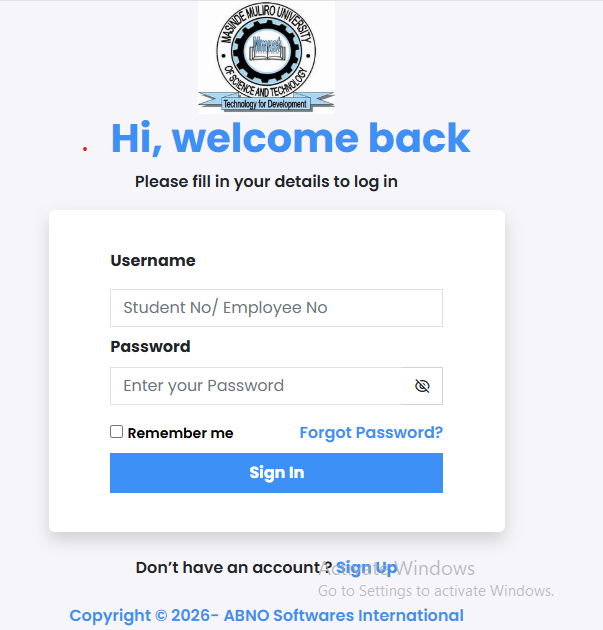
Wait for the login screen to load.
-
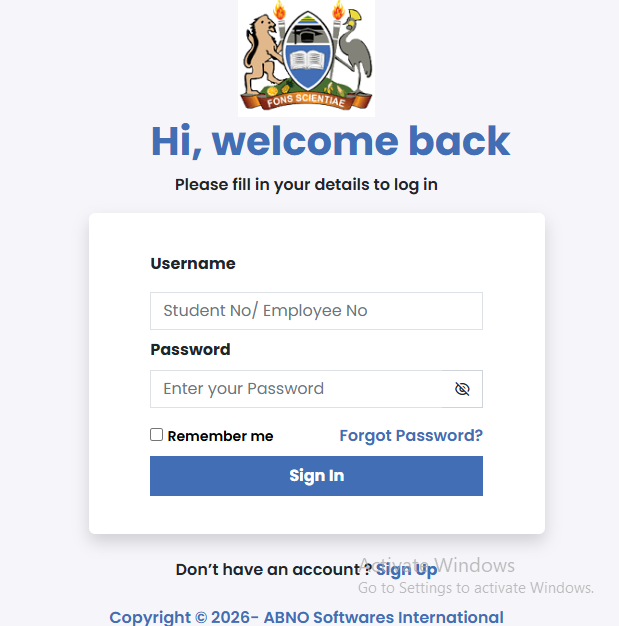
Enter your User ID (Registration Number).
-
Enter your Password.
Costs, Requirements, and Timelines in Kenya
While the MMUST student portal itself is free to use, the activities you do on it are tied to costs and strict deadlines. Missing a deadline on the portal often attracts penalties.
Typical Semester Timeline
| Activity | Typical Timeline | Cost/Requirement |
| Unit Registration | First 2-3 weeks of the semester | Zero fee balance required (usually) |
| Hostel Booking | 2 weeks before opening | Approx. KES 3,000 – 6,000 (varies) |
| Exam Card Printing | 2 weeks before exams | Must have cleared all fees |
| Provisional Results | 1 month after exams | Free access |
Note: Deadlines are strict. If you do not register for units within the first month (the 20% rule), you might be forced to defer your studies.
Step-by-Step Guide: How to Get Started
If you are a first-time user, setting up your account is the first priority. Follow this logical flow to avoid getting locked out.
-
Visit the Website: Go to the official university website or search for “MMUST student portal” on Google.
-
Locate the Login Box: Look for the section asking for “Reg. No” and “Password.”
-
Input Default Details: For new students, your initial password is usually your Registration Number in full (capital letters) or your National ID. Check your admission letter for specific instructions.
-
Change Your Password: The system will likely prompt you to change your password immediately. Choose something strong but memorable.
-
Update Profile: Once logged in, go to “My Profile” and ensure your email and phone number are correct. This is crucial for password recovery later.
-
Navigate the Dashboard: You will see tabs for “Academics,” “Finance,” and “Accommodation.” Click “Finance” first to verify your fee payment has reflected.
Common Mistakes to Avoid
Even fourth-year students make errors that cost them time. Here are the most frequent ones:
-
Forgetting to Log Out: If you use a public computer at a cyber cafe, always log out. If you leave your account open, someone could tamper with your unit registration.
-
Ignoring the “Zero Balance” Rule: You often cannot register for units or print exam cards if you owe the university money (even 100 shillings). Check your balance early.
-
Waiting Until the Deadline: The system often crashes or becomes very slow on the last day of registration due to heavy traffic. Do your registration early.
-
Sharing Passwords: Never share your login details with friends. They might accidentally book a room using your account or mess up your units.
Future Updates or Trends
Universities in Kenya are rapidly digitizing. We are seeing a shift toward integrating university systems with government platforms.
-
eCitizen Integration: Just as eCitizen Kenya handles government services, universities are linking student data to national databases for easier HELB processing and identification.
-
Biometric Attendance: Future updates may link portal course registration to physical biometric attendance in class.
-
Mobile Apps: While the web portal is standard, more universities are moving toward dedicated mobile apps for easier notifications on grades and memos.
Quick Poll:
Which feature do you find most difficult to use on university portals?
A) Unit Registration
B) Checking Fee Balances
C) Booking Hostels
D) Resetting Passwords
(Answer at the end of the post)
FAQ Section
How do I reset my MMUST portal password?
If you forget your password, click the “Forgot Password” link on the login page. You will need to enter your registration number. A reset link or code will be sent to the email address you registered with the university. If you cannot access that email, you must visit the Admissions or ICT office on campus.
Why can’t I register for units?
The most common reason is an outstanding fee balance. The system is programmed to block registration if you have not met the minimum fee payment threshold (usually 50% or 100% depending on the semester timing).
How do I check my exam results online?
Log in to the portal and look for the “Academics” or “Transcripts” tab. Select the current academic year and semester. Note that results are only visible if you have cleared your fees and the lecturers have uploaded the marks.
Can I pay fees through the portal?
You cannot pay directly inside the portal, but you can view payment instructions. Most students pay via M-Pesa Paybill or bank deposit, and then the system updates automatically within 24 to 48 hours.
My Experience
I remember my second year when I completely forgot to register for my units until the very last Friday of the deadline. I rushed to a cyber cafe in town, only to find the MMUST student portal was loading incredibly slowly because everyone else was doing the same thing.
I panicked because I thought I would have to defer the semester. Fortunately, I had cleared my fees a week earlier. After refreshing the page for twenty minutes, I finally got in and clicked “Register.” The relief was immense.
From that day on, I learned to log in at least once a week just to check if everything was in order. I also realized that keeping a screenshot of my fee statement on my phone was a lifesaver when security guards asked for proof of payment at the exam room door. It is a digital tool, but it has very real consequences if you ignore it.
Key Takeaways
-
Keep Details Safe: Memorize your registration number and password.
-
Check Fees: Always confirm your fee balance before attempting to register for units.
-
Be Early: Avoid the end-of-semester rush to prevent system timeout errors.
-
Verify Data: Ensure your email and phone number are updated for password recovery.
-
Use the Right URL: Ensure you are on
portal.mmust.ac.ke.
Conclusion
Navigating the MMUST student portal does not have to be a headache. It is a powerful tool designed to give you autonomy over your studies at Masinde Muliro University. By following the steps above—logging in correctly, registering on time, and monitoring your financials—you ensure your time at university is spent learning, not chasing after administrative issues.
If you are feeling stressed about university life or just need a break, you might want to check out the Best Online Dating Platform in kenya to meet new people. Balancing academics with a social life is key to a great campus experience.
Next Step: Login to your portal today and check if your current semester units are correctly registered. If you found this guide helpful, leave a comment below with your experience!
Answer to Poll: Most students report that C) Booking Hostels is the most difficult feature due to how quickly rooms run out.