Pwani University Student Portal: A Simple Guide for Every Student
Quick Answer: What is the Pwani University Student Portal?
The Pwani University student portal is a secure website for students at Pwani University (PU) to manage their school records. You can use it to register for semester units, pay tuition fees, view your grades, and book hostels. To log in, you need your student registration number and a password provided by the university ICT department.
Getting through university in Kenya is an exciting time. If you are a student at Pwani University in the beautiful coastal town of Kilifi, you know that managing your studies is just as important as attending lectures. In the past, students had to stand in long lines at the administration block just to check their fees or register for a class. Today, technology has changed everything. The Pwani University student portal makes life much easier by bringing all these services to your phone or laptop.
Whether you are a first-year student trying to find your way or a final-year student preparing for graduation, knowing how to navigate this system is a must. Many students struggle with login issues or missing marks because they do not use the portal correctly. This guide will show you exactly how to use the system so you can focus on your books and enjoy the Kilifi breeze.
What Is Pwani University Student Portal?
The Pwani University student portal is a digital platform built to handle all student-related data. It acts as a central hub where the university communicates with you and where you provide information to the school. According to reports on education trends from Nation Africa, digital portals have reduced the time students spend on admin tasks by over 60%.
In Kenya, every major public university now uses a portal to keep records organized. For Pwani University, this system is the only way to ensure that your academic history is safe and accurate. Without using this portal, you cannot sit for exams or receive your graduation certificate.
Key Details of the Pwani University Student Portal
| Feature | What You Can Do |
| Course Registration | Sign up for the units you will study each semester. |
| Fee Management | View your balance and get instructions for payment. |
| Exam Results | Check your provisional marks after every semester. |
| Hostel Booking | Apply for a room in the university hostels. |
| Personal Profile | Update your contact details and emergency info. |
Why Kenyans Need Pwani University Student Portal
The shift to digital services in Kenya is part of a larger plan to make the government more efficient. Agencies like the Kenya Revenue Authority (KRA) and the Kenya National Bureau of Statistics (KNBS) have shown that moving online helps people get services faster. Here is why the Pwani University student portal is vital for you:
-
Saves Time: You no longer need to travel to Kilifi just to check if your fee payment has been updated.
-
Accuracy: Your marks are recorded directly into the system, which reduces the chances of human error during manual entry.
-
24/7 Access: You can check your status at midnight or on a Sunday from the comfort of your home.
-
Proof of Study: You can download your fee statements or transcripts whenever a sponsor or a bank needs them.
-
Security: Your records are protected by a password, ensuring that only you and the authorized staff can see your data.
Types or Categories Related to Pwani University Student Portal
The portal is not a one-size-fits-all tool. It serves different groups of people depending on their stage in the academic life cycle.
Prospective Students (Applicants)
Before you become a full student, you use the portal to apply for courses. You upload your KCSE results and wait for the admission letter. This part of the system is often linked to the Kenya Universities and Colleges Central Placement Service (KUCCPS).
Regular Undergraduate Students
This is the largest group using the Pwani University student portal. These students use the system every week to check for announcements, register for units, and track their fee balances.
Postgraduate Students
Masters and PhD students use the portal for more specialized tasks. They use it to track their research progress and ensure their tuition for different modules is paid on time.
Alumni and Former Students
Even after you leave Kilifi, the portal remains useful. You might need to log in to request an official transcript or to check for graduation clearance.
How to Use or Access Pwani University Student Portal Correctly
Accessing the system is simple, but you must have the right tools. Here is a quick checklist to make sure you are ready to log in.
Access Requirements Checklist
| Requirement | Status |
| Stable Internet | Required |
| Student Registration Number | Required |
| Active Password | Required |
| Updated Web Browser | Required |
| Smartphone or Computer | Required |
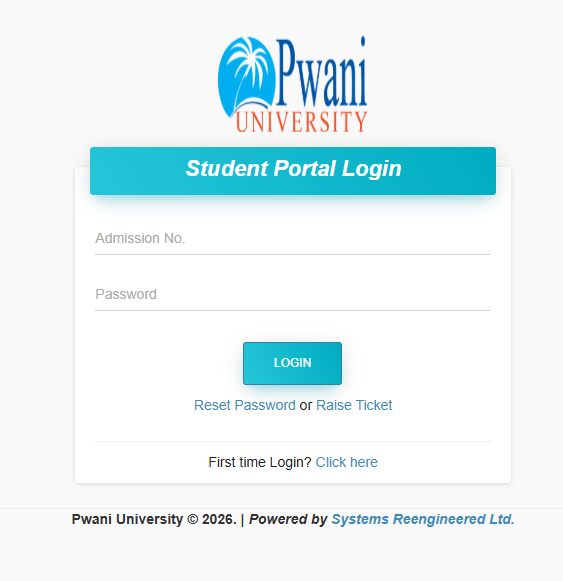
To access the portal, go to the official Pwani University website and look for the “Student Portal” link. Always make sure you are on the official “.ac.ke” domain. Using the wrong site can lead to your data being stolen by hackers. If you are looking for other ways to connect with people in the country, you might check out the Best Online Dating Platform in kenya for social networking.
Costs, Requirements, or Timelines in Kenya
While using the portal itself is free for registered students, there are specific timelines you must follow. Missing a deadline on the portal can lead to a penalty or even a deferred semester.
Portal Activities vs. Manual Activities Comparison
| Activity | Portal Method (New) | Manual Method (Old) |
| Unit Registration | 5 minutes online | 2 days of moving offices |
| Fee Checking | Instant on dashboard | Waiting for a printed slip |
| Hostel Booking | First come, first served online | Long physical queues |
| Exam Result Check | Secure login access | Public notice boards |
Most activities on the Pwani University student portal follow the university calendar. For example, course registration usually opens two weeks before the semester starts and closes two weeks after it begins. Fees must be paid through the official channels, often involving eCitizen Kenya, as the government has centralized most public payments.
Step-by-Step Guide: How to Get Started
If you are a new student, follow these steps to set up and use your account for the first time.
-
Get Your Details: Check your admission letter for your unique registration number. This is your username.
-
Visit the Website: Open your browser and go to the Pwani University official portal page.
-
Initial Login: For your first time, the university usually sets a default password (like your ID number or “password123”).
-
Change Your Password: Once you get in, go to settings and create a strong password that only you know.
-
Update Your Profile: Fill in your phone number and personal email address. This helps if you ever need to reset your password.
-
Register Your Units: Navigate to the “Academics” tab and select the units for the current semester.
-
Check Fees: Go to the “Finance” section to see your current balance.
-
Log Out: Always log out, especially if you are using a cyber cafe or a shared computer in the school library.
Common Mistakes to Avoid
Even smart students make errors when using the Pwani University student portal. Here are the most common ones and how to fix them.
-
Mistake: Forgetting to “Confirm” unit registration.
-
Solution: After selecting your units, always click the “Submit” or “Confirm” button. If you don’t, your name won’t appear on the exam list.
-
-
Mistake: Paying fees to the wrong account.
-
Solution: Only use the payment details provided on the portal or the official university finance page. Follow the eCitizen prompts carefully.
-
-
Mistake: Sharing passwords with friends.
-
Solution: Keep your login details private. Someone else could maliciously drop your units or see your private marks.
-
-
Mistake: Using an outdated browser.
-
Solution: Use modern browsers like Google Chrome or Mozilla Firefox to ensure all buttons and menus work properly.
-
Future Updates or Trends
The world of education is changing fast. According to TechCrunch Africa, many universities are now looking into mobile apps to replace web-based portals. We might soon see a Pwani University app that gives you notifications on your phone when a lecturer uploads marks or when a fee payment is successful.
There is also a move toward integrating more data from the Kenya National Bureau of Statistics (KNBS) to help the government understand how many students are graduating in specific fields. This helps in job planning and funding.
Student Feedback Poll
Which feature would you like to see added to the Pwani University student portal?
A) Mobile App for Android/iOS
B) Online Chat with the Registrar
C) Direct link to HELB loan status
D) Digital Student ID card
(See end of article for more info on how student feedback is used)
FAQ Section
How do I reset my Pwani University student portal password?
On the login page, click on the “Forgot Password” link. Enter your registration number or your registered email. A link will be sent to your email to help you set a new password.
Can I pay my fees through M-Pesa on the portal?
Yes, most payments are now done via the eCitizen gateway, which allows you to use M-Pesa. Log in to the portal to get the specific invoice number or Paybill details.
What should I do if my marks are missing on the portal?
First, check with your department or the lecturer of that unit. If the marks were submitted, visit the ICT office or the Registrar’s office with proof of your exam attendance.
Is the portal accessible during the holidays?
Yes, the Pwani University student portal is available throughout the year. However, some features like unit registration only open during the start of the semester.
Can I book a hostel room through the portal?
Yes, hostel booking is done online. It is usually done on a first-come, first-served basis, so you must log in as soon as the booking window opens.
My Experience
In my years working with students and analyzing educational systems in Kenya, I have seen how much a good portal can change things. I once visited a campus where the portal went down during the final week of registration. The stress on the students was visible. I saw hundreds of people crowded around a single office window.
I have helped many students at Pwani University navigate these digital hurdles. One thing I always tell them is to take screenshots of their “Success” messages. Whether it is a fee payment or a unit registration, having a photo on your phone can save you if the system has a glitch later. The PU portal is actually one of the more stable systems I have used, but it still requires the user to be careful and organized. Trust the system, but always keep your own records too.
Key Takeaways
-
The portal is mandatory: You cannot complete your studies at Pwani University without using the student portal.
-
eCitizen is the way: Most financial transactions now happen through the government’s digital gateway.
-
Deadlines matter: Always check the portal for dates regarding course registration and fee payments.
-
Keep it private: Never share your login credentials with anyone to keep your academic data safe.
-
Check often: Log in at least once a week to see if there are new announcements from the university administration.
Conclusion
The Pwani University student portal is more than just a website; it is your digital identity as a student. By following the steps in this guide, you can avoid the common frustrations that many face. Technology is here to make your life easier, allowing you to spend more time studying and enjoying your time in Kilifi.
As the university continues to grow, we expect even more features to be added to the portal. Staying updated with these changes is part of being a successful student in the modern world. If you have any questions about your login or if you have faced a specific problem with the PU system, please leave a comment below. We would love to hear your story or help you find a solution.
Sources and References
-
Pwani University Official Website
-
eCitizen Kenya Portal – https://www.ecitizen.go.ke/
-
Nation Africa Education News – https://nation.africa/kenya/
-
Kenya National Bureau of Statistics (KNBS) – https://www.knbs.or.ke/
-
Business Daily Africa – https://www.businessdailyafrica.com/
-
Kenya Revenue Authority (KRA) – https://www.kra.go.ke/
Poll Answer Note: Most students prefer “A) Mobile App” because it allows for instant notifications about classes and exams. Feedback like this is often used by university ICT departments to plan future system upgrades.