TSC Payslip: The Complete Guide to T-Pay Login and Registration for Kenyan Teachers
How to Access Your TSC Payslip
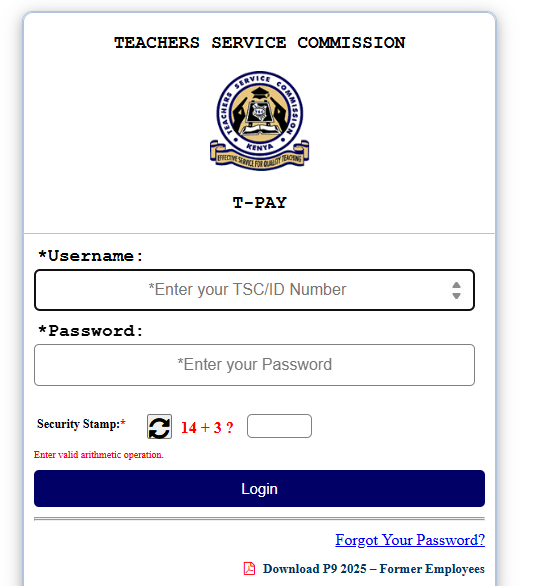
To get your tsc payslip, go to the official T-Pay portal at https://tpay.tsc.go.ke/. Log in using your TSC Number and the password you created during registration. Once on your dashboard, click on “View Payslip” to see your monthly earnings or select “P9” to download your tax records. If you are a new teacher, you must first be registered by your Head of Institution to gain access to the system.
Introduction
Teaching is one of the most respected jobs in Kenya. From the busy streets of Nairobi to the quiet hills of Baringo, thousands of teachers work hard every day to shape the future of our children. However, managing the paperwork that comes with the job used to be a nightmare. Years ago, getting a copy of your pay details meant traveling to the Teachers Service Commission (TSC) headquarters or waiting for weeks for a printed copy to arrive at your school.
Everything changed with the introduction of the T-Pay portal. Now, you can check your tsc payslip from your phone while sitting in your living room. This digital change has made life easier, but it also comes with new challenges. Many teachers struggle with login errors, forgotten passwords, or knowing how to use the system for loan applications.
Whether you are a new teacher just starting your career or a veteran preparing for retirement, knowing how to navigate the portal is a must. This guide will walk you through everything you need to know about your digital records in a simple, easy-to-follow way.
What Is the TSC Payslip?
A tsc payslip is an official digital document issued by the Teachers Service Commission. It shows exactly how much a teacher has earned in a specific month. It also lists all the money taken out for taxes, insurance, and other services.
In Kenya, this document moved from being a piece of paper to a digital record on the T-Pay system. This was part of a bigger plan by the government to digitize services, as reported by Business Daily Africa. The portal is now the only way for teachers under the TSC payroll to verify their income.
Key Details of the T-Pay System
| Feature | Description |
| Portal Name | T-Pay (formerly Online Payslip) |
| Official Website | tpay.tsc.go.ke |
| User Identification | TSC Number |
| Primary Documents | Monthly Payslips, P9 Forms |
| Usage | Loan approvals, Tax filing, Income proof |
Why Kenyans Need the TSC Payslip
Accessing your tsc payslip is not just about checking if your salary has arrived. It serves several vital roles in the life of a Kenyan civil servant.
-
Bank and SACCO Loans: If you want to buy land or build a house, most banks and SACCOs will ask for your last three payslips. The portal allows you to send your payslip directly to these institutions for approval.
-
KRA Tax Returns: Every year between January and June, Kenyans must file tax returns. You need the P9 form from the portal to do this correctly on the Kenya Revenue Authority (KRA) website.
-
Checking Deductions: With the new Social Health Insurance Fund (SHIF) and Housing Levy, teachers need to see how much is being deducted.
-
Personal Budgeting: It helps you track your net pay (the money that actually enters your bank account) so you can plan for your family’s needs.
-
Verification of Employment: It acts as proof that you are an active employee of the government.
Types of Records on the T-Pay Portal
The portal is organized into different sections so you don’t get confused.
Monthly Payslips
These are the most accessed files. They show your basic salary, house allowance, commuter allowance, and any hardship allowance if you work in specific areas.
P9 Forms
This is a summary of all your earnings and taxes for a full year. You only need this once a year for your KRA returns. It is usually updated every February.
Third-Party Transaction Logs
If you have a loan with a bank or a monthly contribution to a teacher’s union (like KNUT or KUPPET), these show up here. You can see which companies are allowed to take money from your salary.
How to Use or Access the TSC Payslip Correctly
Accessing the system requires a bit of preparation. You cannot just create an account like you do on social media. The TSC has strict security to protect your money.
Access Checklist
-
[ ] TSC Number: You must have your official employee number.
-
[ ] Valid Password: Created during your first registration.
-
[ ] Head of Institution Verification: Your school principal must “clear” you in the system.
-
[ ] Internet Connection: A stable 4G or Wi-Fi connection is recommended.
-
[ ] PDF Reader: To view the downloaded files on your phone or laptop.
Costs, Requirements, and Timelines in Kenya
The good news is that accessing your tsc payslip is free. The government does not charge teachers to view their own records. However, there are specific timelines you should keep in mind.
| Requirement | Cost | Timeline |
| Account Registration | KES 0 | Done once when you join TSC |
| Monthly Login | KES 0 | Available from the 20th of each month |
| P9 Form Download | KES 0 | Available from February to June |
| Password Reset | KES 0 | Can take 5 minutes to 24 hours |
Data from the Kenya National Bureau of Statistics (KNBS) shows that more teachers are using digital portals every year, which helps reduce the time spent on administrative tasks.
Step-by-Step Guide: How to Get Started
If you are new to the system or haven’t logged in for a while, follow these simple steps to see your tsc payslip.
-
Visit the Portal: Open your browser and go to
tpay.tsc.go.ke. -
Enter Your Username: In the username box, type your TSC Number.
-
Enter Your Password: Type the secret password you chose.
-
Security Image: You might see a small box with letters or numbers (a Captcha). Type those exactly as they appear.
-
Click Login: This will take you to your personal dashboard.
-
View Payslip: Click on the “View Payslip” menu. Select the year and the month you want to see.
-
Download or Print: A PDF will appear. You can save this to your phone or send it to a printer.
-
Logout: Always click the logout button, especially if you are using a computer in a cyber cafe or a staff room.
Common Mistakes to Avoid
Even with a simple system, things can go wrong. Here are some common traps teachers fall into.
-
Sharing Passwords: Never give your T-Pay password to anyone, including people claiming to be “TSC agents.” They can use your portal to apply for unauthorized loans.
-
Using Public Computers: If you must use a cyber cafe, ensure you don’t save your password on the browser.
-
Waiting Until the Last Minute for P9: Many teachers wait until June 29th to download their P9 forms. The site often gets very slow because everyone is trying to use it at once. Download it in March or April.
-
Forgetting to Update Email: If you lose your password, the reset link is sent to your email. If that email is old or you can’t access it, you will have to visit the TSC county office in person.
Future Updates and Trends
The TSC is constantly moving toward a more integrated system. There are plans to link the tsc payslip portal directly with the eCitizen Kenya platform. This will allow teachers to access all government services using one single login.
We are also seeing a trend where more SACCOs are using “direct integration.” This means instead of you downloading a PDF and carrying it to the bank, you give the bank a “one-time code” that allows them to view your pay details for a few minutes. This is much safer and faster.
According to Nation Africa, the commission is also working on a mobile app that will allow teachers to manage their files without using a web browser.
Quick Poll:
How do you currently access your T-Pay portal?
A) On my personal smartphone
B) Using a laptop at home
C) At a cyber cafe
D) I ask a colleague to help me
(Think about your answer—most teachers are now moving toward Option A for better security.)
FAQ Section
Q: I have forgotten my T-Pay password. How do I reset it?
A: Click on the “Forgot Password” link on the login page. You will be asked for your TSC number. A reset link will be sent to the email address you registered with. If you don’t see it, check your “Spam” folder.
Q: Can I access my payslip if I am on leave or interdiction?
A: As long as you are still on the TSC payroll, you should be able to log in. However, if your salary has been stopped, you might not see a new payslip for that month.
Q: Why is my latest payslip not showing?
A: TSC usually uploads the latest tsc payslip between the 20th and 25th of every month. If it is the 15th, you might only see the previous month’s record.
Q: How do I stop a third-party deduction from my payslip?
A: You must contact the company taking the money first. Once they agree to stop, they send a “stop order” to TSC. You can also visit your TSC County Human Resource office for help if a deduction is illegal.
Q: Is the T-Pay portal different from the HRMIS portal?
A: Yes. T-Pay is specifically for money matters (payslips and P9s). The HRMIS portal is for things like applying for leave, promotions, or transfers.
My Experience
I remember when my friend, a teacher in Kiambu, first tried to apply for a car loan. He was so used to the old way of doing things that he spent a whole day traveling to the TSC headquarters in Upper Hill, Nairobi. He sat in the waiting room for hours just to get a stamped copy of his pay details.
When he finally got to the desk, the officer told him, “Mwalimu, you can do all this from your phone now.”
He was surprised. We sat down together at a local café, and I showed him how to log in. Within five minutes, he had sent his tsc payslip directly to his bank’s portal. He didn’t need to print anything or pay for a stamp. That experience taught me that many people are not using these tools simply because they are afraid of the technology. Once you try it, you realize it saves you so much time and money.
It is just like any other part of modern life in Kenya. Whether you are looking for the Best Online Dating Platform in kenya or trying to file your taxes, the digital way is almost always better once you learn the steps.
Key Takeaways
-
Security First: Always keep your password private and change it every few months.
-
Timing: Check your records after the 20th of the month for the most recent updates.
-
P9 Records: Download your P9 form early in the year to avoid the June deadline rush.
-
Verification: Ensure your Head of Institution has updated your profile, or you won’t be able to log in.
-
Direct Sharing: Use the “Send Payslip” feature for bank and SACCO applications instead of printing.
Conclusion
The tsc payslip is more than just a summary of your salary; it is a vital tool for your financial freedom. By moving to the T-Pay system, the TSC has given teachers the power to manage their own records without relying on middlemen. While it might seem technical at first, the steps are straightforward and designed for everyone to use.
Take some time this month to log in and look at your deductions. Make sure everything is correct. If you find a mistake, don’t wait—report it to your school head or the nearest TSC office immediately.
Teaching is a busy profession, and you deserve a system that works as hard as you do. Stay updated, stay secure, and make the most of the digital tools available to you.
Do you have any questions about your T-Pay account? Have you had trouble resetting your password? Leave a comment below, and let’s help each other out!
Sources and References
-
Kenya National Bureau of Statistics (KNBS) – For employment data.
-
Business Daily Africa – For news on government digitization.
-
Kenya Revenue Authority (KRA) – For P9 and tax filing guidelines.
-
Nation Africa – For the latest updates on teacher welfare and pay.
-
eCitizen Kenya – For integrated government service information.
Poll Results Discussion:
Most Kenyan teachers prefer using their smartphones to check their records. This is because mobile browsers have become very fast, and it is easier to keep your phone secure than a public computer. If you chose Option D, try following the steps in our “Step-by-Step” guide above to gain your independence!